Custom symbols
Custom symbols let you replace selected built-in symbols with your own reusable graphics.
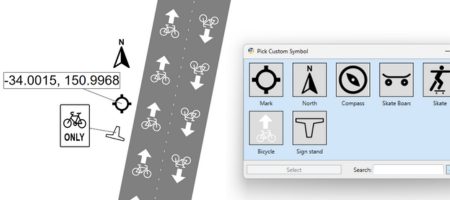
What custom symbols are for
Use custom symbols when you want to:
- match a company or client visual standard,
- reuse the same approved symbol on many plans,
- replace a built-in icon with a preferred local convention.
Supported objects
The unified custom symbol system is available on selected objects, including:
- Bike Lane,
- North Arrow,
- Arrow Board,
- LUMS Board,
- Location Marker,
- Sign Stand.
Support can expand over time, so check the Properties palette on the object you are using.
How to use a custom symbol
- Select a supported object.
- In the Properties Grid, enable Custom symbol.
- Choose the symbol you want to use from the custom symbol picker.
The object keeps behaving like its normal RapidPlan object, but its built-in symbol is replaced by your chosen custom one.
When to use this feature
Custom symbols work well when the symbol itself should stay consistent, but the object still needs RapidPlan behavior such as:
- snapping,
- geometry or placement logic,
- object properties,
- inclusion in legends or manifests where supported.
Related content
- use Location markers for map pin style annotations,
- use Signs palette when you need actual sign-library content rather than symbol replacement.